Ajari: Modern E-Learning iOS UI Kit
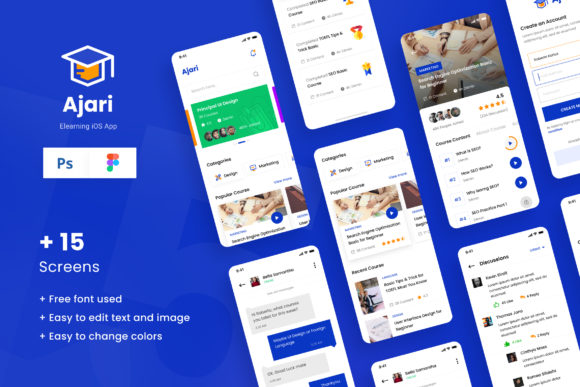
Creating a successful educational application requires more than just robust content; it demands an interface that invites users in, guides them effortlessly, and keeps them engaged. This is where the Ajari - E-learning IOS App Design UI template becomes an invaluable resource for designers and developers. Whether you are building a platform for university students, corporate training modules, or hobbyist workshops, the visual foundation of your app sets the tone for the entire learning experience. Ajari provides a comprehensive set of fifteen unique screens designed specifically for the modern iOS environment, offering a blend of aesthetic appeal and functional clarity.
Why Interface Design Matters in Education
In the crowded marketplace of digital education, user retention is heavily influenced by usability. If a student struggles to find their next lesson or feels overwhelmed by a cluttered dashboard, they are likely to abandon the course. The Ajari template addresses these pain points by utilizing a clean, modern layout that prioritizes content hierarchy. Designed with the recommended 375px x 812px resolution for iPhone XI Pro, it ensures that every element is perfectly scaled for contemporary devices. This attention to detail means that educators and entrepreneurs can focus on pedagogy and business strategy rather than getting bogged down in pixel-perfect adjustments from scratch.
Tailored Solutions for Different Creators
The versatility of the Ajari design system allows it to serve a wide spectrum of creators, each with distinct priorities and goals. Understanding how different groups can leverage this template helps in maximizing its potential.
For Entrepreneurs and Startups
If you are launching a new e-learning startup, speed to market is often critical. Developing a custom UI from zero can take months of iteration. With Ajari, you gain immediate access to fifteen high-quality screens in both PSD and Figma formats. This dual-format availability is crucial because it accommodates different workflow preferences. Teams using Adobe Photoshop can manipulate raster elements with precision, while those favoring Figma can collaborate in real-time and utilize vector-based scalability. For a founder, this translates to a significant reduction in initial design costs and a faster prototype phase, allowing for quicker user testing and investor presentations.
For Educators and Institutions
Schools and independent educators often have limited technical resources but high standards for presentation. The Ajari template uses free fonts from Google Fonts, ensuring that there are no licensing hurdles or additional costs involved in typography. This accessibility is vital for academic institutions operating on tight budgets. Furthermore, the well-documented nature of the files means that even those with intermediate design skills can customize the branding to match their school’s identity. An educator might use the course detail screens to highlight curriculum structures, while the profile screens can be adapted to show student progress and achievements, fostering a sense of community and accomplishment.
For Freelancers and Agencies
Design agencies and freelancers frequently face the challenge of delivering unique, high-end looks under tight deadlines. Ajari serves as a robust starting point that can be heavily customized. Because the files are easy to edit, a designer can swap out color palettes, adjust spacing, and modify icons to create a bespoke look for a client without starting from a blank canvas. The inclusion of PDF documentation ensures that handoffs between designers and developers are smooth, reducing miscommunication and revision cycles. For a freelancer, this efficiency directly impacts profitability, allowing them to take on more projects without compromising quality.
Key Features and Technical Flexibility
The technical construction of the Ajari template is designed for ease of use and long-term reliability. Each of the fifteen screens is crafted to cover essential user journeys within an e-learning app. These typically include onboarding flows, home dashboards, course listings, detailed lesson views, video player interfaces, and user profiles. By covering these core areas, the template ensures a cohesive experience throughout the app.
- High-Quality Assets: The screens are rendered at high resolution, ensuring they look stunning on Retina displays.
- Flexible Formats: Availability in both PSD and Figma allows for seamless integration into existing design systems.
- Standardized Dimensions: Built on the 375px x 812px canvas, it aligns with standard iOS design guidelines, making the transition to code smoother for developers.
- Open Typography: Utilizing Google Fonts ensures compatibility and ease of customization across different platforms.
It is important to note that while the design files are comprehensive, all images used in the preview are for demonstration purposes only and are not included in the main download. This is a standard practice in UI kits, encouraging designers to insert their own brand-specific imagery, which ultimately makes the final product more authentic and tailored to the specific niche of the e-learning platform.
Evaluating Fit for Your Project
Before integrating Ajari into your workflow, consider your specific project requirements. If you are building a highly complex gamified learning platform with intricate animations, this static UI kit will serve as an excellent visual guide, but you may need to extend the design system for interactive states. However, for standard course delivery apps, subscription-based learning platforms, or institutional portals, Ajari provides nearly everything needed for a professional launch.
For beginners in app design, the well-documented structure offers a learning opportunity. By deconstructing how the screens are layered and organized in Figma or Photoshop, novice designers can gain insights into best practices for mobile UI composition. For experienced professionals, the value lies in the time saved on routine layout tasks, freeing up mental energy for solving complex user experience challenges.
Enhancing User Engagement Through Design
The ultimate goal of any e-learning app is to facilitate knowledge transfer. A cluttered or confusing interface acts as a barrier to this goal. Ajari’s modern aesthetic reduces cognitive load, allowing learners to focus on the material. Clean lines, ample white space, and clear typography contribute to a stress-free learning environment. For consumers and hobbyists using the app, this means a more enjoyable experience, which increases the likelihood of course completion.
Moreover, the visual appeal of the app can influence perceived value. A polished, professional interface suggests high-quality content, which is a significant factor for users deciding whether to purchase a course or subscribe to a service. For small business owners selling expertise, the credibility conveyed by a well-designed app can justify premium pricing.
Conclusion
The Ajari - E-learning IOS App Design UI template is more than just a collection of screens; it is a strategic tool for anyone looking to make an impact in the digital education space. By providing a solid, customizable foundation, it empowers entrepreneurs, educators, and designers to build applications that are not only functional but also visually compelling. Whether you are prioritizing speed, cost-efficiency, or design excellence, Ajari offers a balanced solution that adapts to your unique needs. As the demand for online learning continues to grow, having a reliable and attractive interface will remain a key differentiator in the market.