Global Edu: Transforming Education Presentations
In the fast-paced world of education and professional training, the ability to communicate complex ideas clearly is paramount. Whether you are a university professor lecturing on macroeconomics, a corporate trainer explaining new compliance protocols, or an online course creator launching your first tutorial series, your visual aids play a critical role in audience retention. This is where Global Edu - Education PowerPoint steps in as a versatile, robust solution designed to streamline the creation of high-impact presentations.
Rather than starting from a blank slide—a process that often leads to design fatigue and inconsistent branding—this template offers a structured foundation. It is not merely a collection of pretty graphics; it is a functional toolkit built for educators, coaches, and business leaders who value both aesthetics and efficiency. By leveraging clean layouts and editable infographics, users can focus on their message rather than wrestling with alignment tools and font pairings.
Why Design Consistency Matters in Learning
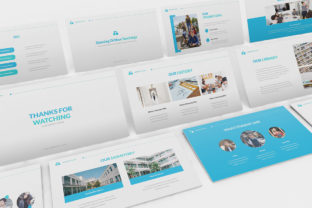
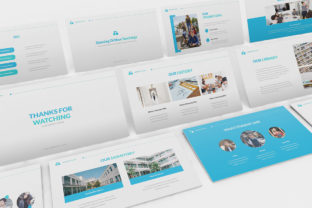
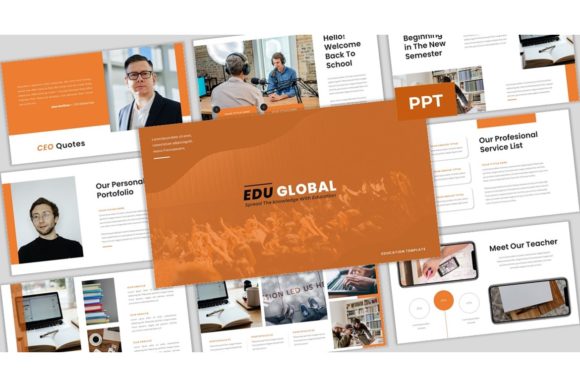
Cognitive load theory suggests that learners have a limited amount of working memory. When a presentation is cluttered, visually chaotic, or inconsistent, the brain wastes energy processing the design rather than the content. Global Edu - Education PowerPoint addresses this by providing 34 unique slides that adhere to a cohesive visual language. The clean, simple slides ensure that text remains legible and images serve a purpose, rather than acting as distractions.
The template utilizes free web fonts, which means you do not need to worry about licensing issues or missing typefaces when sharing your file with colleagues or students. This accessibility is crucial for collaborative environments where multiple stakeholders might need to edit or view the presentation. Furthermore, because the graphics are fully resizable and editable, you can tailor every element to fit your specific institutional branding or personal style without losing quality.
Versatile Applications Across Industries
While the name suggests a primary focus on academic institutions, the utility of this template extends far beyond the classroom. Its modular design allows for adaptation across various sectors. Here is how different professionals can leverage this tool:
- University Professors and Researchers: Use the image gallery slides to showcase historical artifacts, scientific diagrams, or case study results. The master slide functionality ensures that every lecture in a semester maintains a uniform look, reinforcing professional credibility.
- Online Course Providers: For those creating video-based tutorials, the 16:9 wide-screen ratio is ideal for modern monitors and mobile devices. The drag-and-drop picture placeholders allow for rapid iteration, enabling creators to update course materials quickly as industry standards evolve.
- Corporate Trainers and HR Departments: Onboarding new employees requires clear, engaging visuals. The editable infographics can be used to map out organizational structures, workflow processes, or benefit packages, making dense information digestible for new hires.
- Coaches and Consultants: Life coaches and business consultants often rely on frameworks and models. The template’s diagrammatic slides provide a ready-made canvas for illustrating growth mindsets, strategic planning cycles, or feedback loops.
Maximizing the Template’s Features
To get the most out of Global Edu - Education PowerPoint, it is helpful to understand its technical architecture. The template is based on Master Slides, which is a powerful feature for maintaining consistency. When you adjust a color scheme or font size on the master slide, it automatically updates across all 34 unique slides. This saves hours of manual editing and prevents the common error of having slightly different shades of blue or mismatched headers throughout a deck.
The inclusion of an image gallery and picture placeholders simplifies the media integration process. Instead of manually cropping and resizing photos, you simply drag and drop your images into the designated areas. The template handles the aspect ratio and framing, ensuring a polished look every time. This is particularly useful for educators who may not have advanced graphic design skills but still want their materials to look professional.
Additionally, the editable infographics are a standout feature. Data visualization is essential for making arguments persuasive. Whether you are presenting enrollment statistics, survey results, or financial projections, these pre-designed charts allow you to input your data directly. The clean lines and balanced spacing ensure that even complex data sets appear approachable and clear.
Creative Strategies for Engagement
Having a great template is only half the battle; how you use it determines its effectiveness. Here are some practical strategies to enhance your presentations using this framework:
Storytelling Through Structure: Do not just list facts. Use the sequence of slides to tell a story. Start with a problem statement, use the infographic slides to show data supporting the issue, and conclude with a solution. The narrative flow should guide the audience logically from one point to the next.
Visual Hierarchy: Although the template provides a clean base, you must still prioritize information. Use bold text sparingly to highlight key takeaways. Ensure that headings are distinct from body text. The 16:9 ratio offers ample horizontal space, so avoid cramming too much text onto a single slide. Instead, spread concepts across multiple slides to maintain pacing and interest.
Interactive Elements: If you are presenting live, use the image gallery slides as discussion prompts. Ask your audience to interpret a chart or analyze a photo before revealing your explanation. This active learning approach keeps participants engaged and transforms a passive lecture into an interactive workshop.
Technical Practicality and File Management
For freelancers and small business owners, time is money. The Global Edu - Education PowerPoint package includes a PowerPoint .PPTX file and a documentation file, ensuring you have all the resources needed to get started immediately. The documentation provides guidance on how to customize the master slides and manage fonts, reducing the learning curve.
It is important to note that while the demo images showcase the template’s potential, they are for preview purposes only and are not included in the final download. This is standard practice and encourages users to populate the slides with their own relevant, copyright-cleared imagery. Using original photos or licensed stock images that align with your specific topic will make your presentation feel authentic and tailored.
The compatibility with standard PowerPoint versions ensures that you can share your work with clients or students regardless of their software version. Since it uses free web fonts, recipients will see the text exactly as you intended, without substitution errors that often plague presentations using proprietary typography.
Final Thoughts on Educational Design
In an era where attention spans are shortening and competition for engagement is fierce, the quality of your visual communication can set you apart. Global Edu - Education PowerPoint offers a balance of simplicity and sophistication. It removes the technical barriers to good design, allowing educators, trainers, and creators to focus on what they do best: teaching and inspiring.
By adopting a template that prioritizes clarity, consistency, and ease of use, you invest in the effectiveness of your message. Whether you are designing a syllabus, a corporate workshop, or an online webinar, this tool provides the structural integrity needed to deliver your content with confidence. Embrace the flexibility it offers, customize it to reflect your unique voice, and watch your audience’s understanding and engagement grow.