Sakola: Elegant School PowerPoint & Canva Template
In the fast-paced world of education and institutional branding, clarity is not just a design choice; it is a necessity. Whether you are a teacher explaining complex concepts, a student presenting a capstone project, or an administrator outlining a strategic vision, your visual aids must communicate effectively without overwhelming the audience. This is where Sakola - Elegant School PowerPoint Canva steps in as a transformative tool for modern presenters.
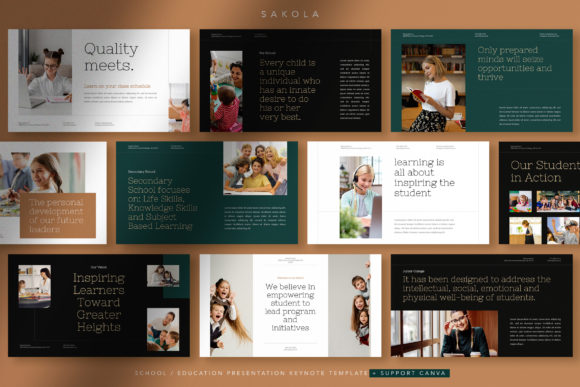
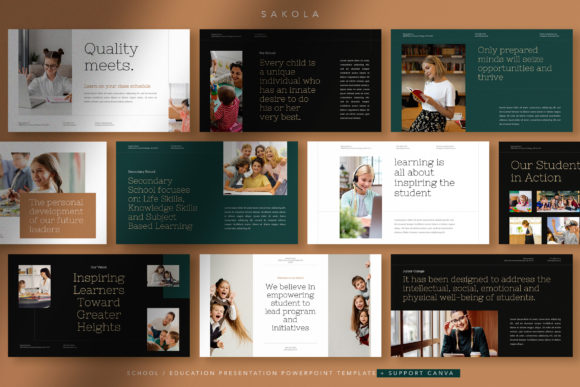
Designed with a keen understanding of how we process information visually, Sakola moves away from cluttered, distracting layouts. Instead, it embraces a minimal and modern aesthetic that prioritizes readability and impact. By focusing on big headlines and structured heavy text, this template ensures that your message remains the hero of the presentation. It is not merely a collection of slides; it is a framework for clearer communication, built to elevate the brand identity of schools, colleges, and educational organizations.
The Power of Minimalism in Educational Design
Many educators and professionals fall into the trap of over-designing their presentations. They add excessive animations, conflicting colors, and dense paragraphs that force the audience to read rather than listen. Sakola challenges this norm by leveraging the power of white space and typographic hierarchy. The template’s design philosophy centers on a "big headline" approach. This technique immediately grabs attention and provides a clear anchor for each slide.
When you combine these bold headlines with high-quality images, the result is a presentation that is both standout and easy to read. The modular grid system used in Sakola allows for seamless integration of text and visuals. This balance is crucial for maintaining audience engagement. For teachers, this means students can focus on the lesson’s core concepts. For school organizations, it means stakeholders can quickly grasp key data points and mission statements without wading through visual noise.
Versatility Across Educational Roles
One of the most compelling aspects of Sakola - Elegant School PowerPoint Canva is its adaptability. It is not limited to a single user type but serves a diverse ecosystem within the education sector.
- For Teachers: Lesson plans often involve heavy content. Sakola’s support for dense text, organized through clean layout structures, allows educators to present detailed information without sacrificing aesthetics. You can break down complex subjects into digestible segments, using the 30 unique layout slides to vary the pace and visual interest of your lecture.
- For Students: Academic presentations require professionalism. Using a polished template like Sakola helps students convey seriousness and attention to detail. Whether it is a science fair project or a literature review, the modern design lends credibility to their work, helping them stand out in competitive academic environments.
- For School Organizations: Brand identity is vital for institutions seeking funding, partnerships, or community support. Sakola provides a cohesive look that can be customized with school colors and logos. It is perfect for presenting annual reports, strategic plans, or introduction decks to new parents and staff.
Seamless Editing with PowerPoint and Canva
Accessibility is a cornerstone of good design. A beautiful template is useless if it is difficult to edit. Sakola bridges the gap between professional design software and user-friendly platforms by supporting both PowerPoint (PPT/PPTX) and Canva. This dual compatibility ensures that you can work in the environment you are most comfortable with.
If you prefer the robust features of Microsoft PowerPoint, you will appreciate that Sakola is built using Slide Master Layouting. This technical foundation means that changes made to the master slide automatically propagate throughout the presentation. You can easily edit titles, sub-titles, body text, images, and colors without breaking the layout. The use of a modular grid further simplifies the expansion of the deck. If you need to add more slides, they will naturally align with the existing design language, ensuring consistency from start to finish.
For those who prefer cloud-based collaboration and intuitive drag-and-drop interfaces, the Canva version offers the same level of flexibility. You can access your presentation from any device, share it with colleagues for real-time feedback, and utilize Canva’s extensive library of elements to enhance your slides. Both versions utilize free fonts from Google Fonts, ensuring that your typography remains crisp and consistent regardless of where the file is opened.
Creative Applications Beyond the Classroom
While Sakola is tailored for the education sector, its clean and contemporary design makes it suitable for a wider range of applications. Creative professionals, marketers, and entrepreneurs can adapt this template for various purposes.
Consider a corporate training session. The heavy-text capability of Sakola is ideal for compliance training or technical onboarding where detailed information must be conveyed accurately. Similarly, non-profit organizations focused on literacy or community development can use Sakola to present their impact reports. The full HD resolution (1920x1080 pixels) ensures that every chart, graph, and image looks sharp on large screens during conferences or webinars.
Freelancers and consultants in the education technology space can also leverage Sakola to pitch their services. The elegant design reflects a high standard of quality, helping to build trust with potential clients. By customizing the color scheme to match their personal brand, freelancers can create a cohesive narrative that aligns with their professional identity.
Practical Tips for Maximizing Sakola
To get the most out of Sakola - Elegant School PowerPoint Canva, consider these practical recommendations:
- Prioritize Hierarchy: Use the big headline feature to state the main idea of each slide clearly. Keep sub-titles concise and use body text for supporting details. Avoid dumping entire paragraphs onto a single slide; instead, spread content across multiple slides using the varied layouts.
- Leverage High-Quality Imagery: While the template does not include images, it is designed to showcase them effectively. Use high-resolution photos that relate directly to your content. Ensure that images do not clash with the text; the modular grid helps position them harmoniously.
- Consistent Color Usage: Although you can easily change colors, stick to a limited palette that reflects your institution’s brand. Use accent colors sparingly to highlight key data points or calls to action.
- Utilize Slide Masters: Before you begin adding content, spend a few minutes setting up your Slide Master in PowerPoint. Define your primary fonts and color themes here. This upfront investment saves time and ensures uniformity across all 30 unique layout slides.
Elevating Your Presentation Standards
In an era where attention spans are short and expectations for visual quality are high, having a reliable, elegant template is a significant advantage. Sakola - Elegant School PowerPoint Canva offers more than just aesthetic appeal; it provides a structured approach to storytelling. By combining heavy content capabilities with a minimalist design, it solves the common dilemma of how to present detailed information without boring the audience.
Whether you are crafting a lesson plan, preparing a student thesis, or defining your school’s public identity, Sakola empowers you to communicate with confidence. Its ease of editing, compatibility with popular platforms, and focus on readability make it an indispensable resource for anyone in the education sector. Embrace the clarity and elegance of Sakola, and take your presentations to the next level.
Note: All images shown in previews are for demonstration purposes only and are not included in the main files. This allows you the freedom to choose imagery that best suits your specific narrative and brand guidelines.